Condo Breakeven
The lowest price you can sell a rented condo for without losing money.
If you bought a condo in Singapore (or any city with similar laws) and rented it out, there are many hidden costs to consider before deciding on an expected selling price- initial buying cost, stamp duty, monthly interest, maintenance, property tax and tax on the rent. Every new lease cost an agent fee, and something in the unit might always need fixing. The rent came in against all of that. Then when you sell, the agent, the lawyers and sometimes IRAS take their share.
I made Condo Breakeven as a fun experiment to help friends factor all this in easily. You type in your own figures, and it tells you the lowest price you can sell for without losing money. Use it here. It starts with figures for a made-up unit, so you see results before you type anything.
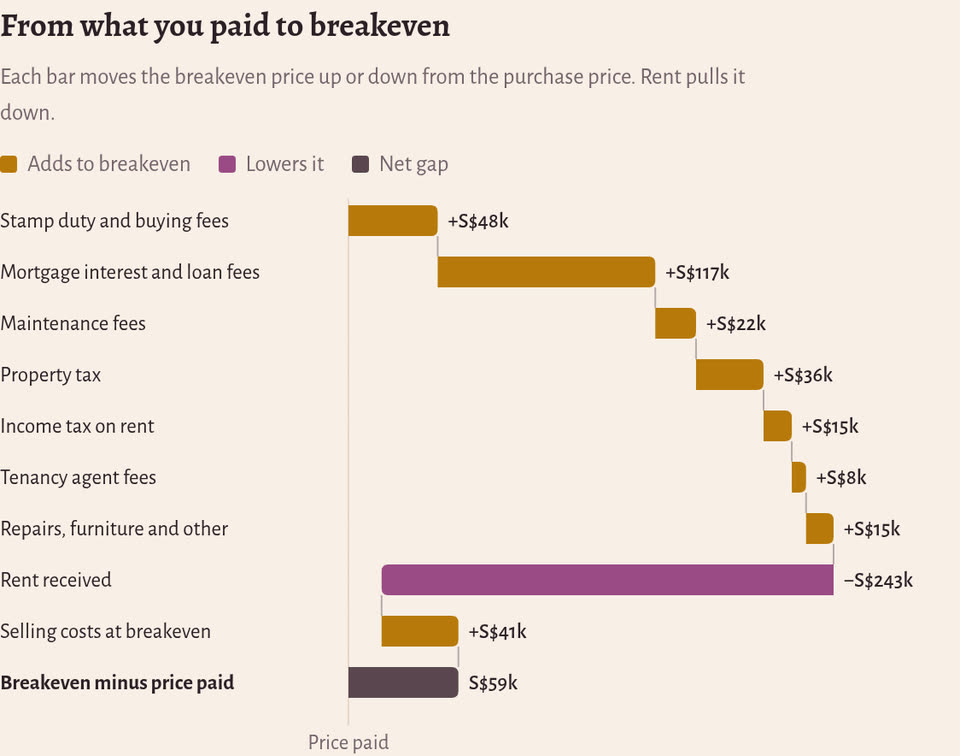
The made-up unit cost S$1,180,000 in August 2022. To sell it on 31 March 2027 without a loss, it needs at least S$1,239,188. That’s S$59,188 more than it cost, even after S$243,300 of rent.
What it counts§
- Buying: the price, buyer’s stamp duty (from the IRAS rates), ABSD if you paid any, and the agent, legal and valuation fees.
- The loan: interest, worked out month by month. Add a row each time the bank repriced your loan, and it uses the new rate from that month. Repayments of the loan itself aren’t a cost, because the sale pays off whatever is left.
- Running costs: maintenance, property tax, income tax on the rent, insurance, the agent fee for each lease, and one-off spending such as furniture, repairs and repainting between tenants.
- Rent: whole months only, and only the months before the sale.
- Selling: the agent’s commission with GST, legal fees, seller’s stamp duty, and the bank’s penalty if you sell before your loan’s lock-in ends.
The first chart shows how each of these moves the breakeven price up or down from what you paid. For the example unit, interest is the biggest cost, and the rent covers about four fifths of all the costs.
When to sell§
The date can matter as much as the price. Seller’s stamp duty depends on how long you’ve owned the unit. If you bought between 11 March 2017 and 3 July 2025, it’s 12% of the price if you sell in the first year, 8% in the second and 4% in the third. If you bought on or after 4 July 2025, it’s 16%, 12%, 8% and 4% over four years. The calculator counts from the day you exercised your option to purchase.
Moving the sale date shows what that costs. Selling the example unit on 30 April 2025, still in its third year, needs S$1,346,136. A month later, on 31 May 2025, it needs S$1,288,109. Waiting that one month is worth S$58,027, and almost all of it is the 4% duty. At a price of S$1,320,000, the first sale makes a loss of S$24,521 and the second a profit of S$31,196.
The loan works the same way. Most banks charge a penalty if you pay off the loan during its lock-in period, often 1.5% of what you still owe. The example unit’s lock-in ends in August 2027, so selling it in March 2027 costs a S$11,533 penalty.
A sale takes a few weeks to go through, and the calculator uses one date for all of it. If your date is close to one of these lines, ask your lawyer which date counts, and leave some time to spare.
Reading the charts§
The profit chart shows the profit or loss at every price around breakeven. Move the mouse over it, or drag a finger across it on a phone, to read off any price. The same numbers are also in a table under it.
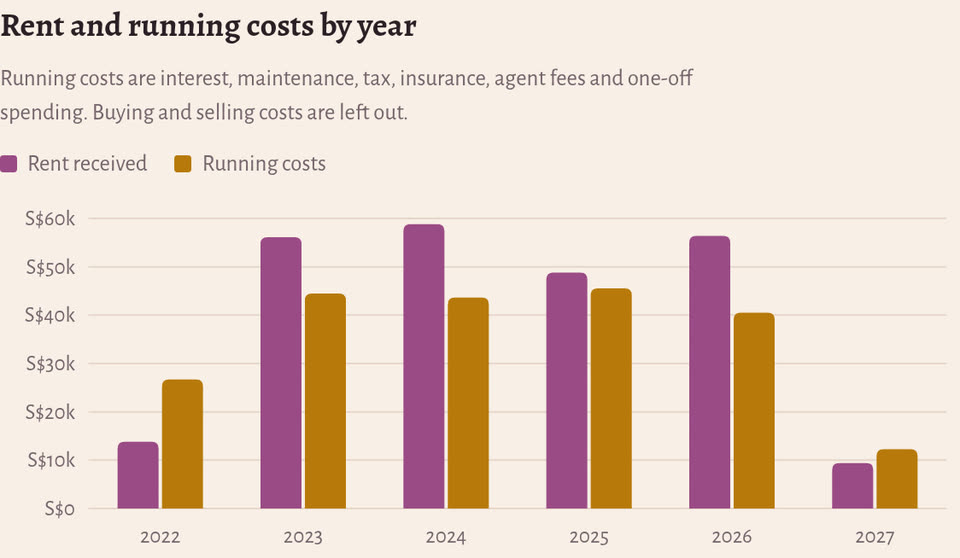
The bar chart puts each year’s rent next to that year’s running costs. Under it, the ledger lists every sum. It also shows how much cash reaches your bank account after the loan is paid off and your CPF money goes back to your CPF account. That refund isn’t counted as a cost, because the money is still yours.
What it leaves out§
It doesn’t count what your downpayment could have earned if you had put it somewhere else, or the interest CPF adds to the money you took from it. It also takes your bills as you typed them. If you try an earlier sale date, remove the bills you wouldn’t have paid by then.
Your figures stay in your browser§
The calculator is a single HTML file with no libraries and no server. It runs in your browser and saves your figures only in that browser, so you can close the tab and come back later. Nothing is sent anywhere. Even the fonts come from the same place as the page.
The code is open source under the MIT licence, at github.com/sidcode/condo-breakeven. It comes with an Excel workbook that does the same sums with formulas you can check, and a short Python script that builds the workbook, from the example or from a file of your own figures. On the example, the calculator and the workbook agree to the cent.
Tax rates change. The ones here were right in November 2026, but check them with IRAS and your bank before you decide anything. This is a calculator, not financial advice.